
Always-On AI in a Box: When knowledge work becomes capital equipment
TL;DR
What do we mean when we say an AI agent in a box?
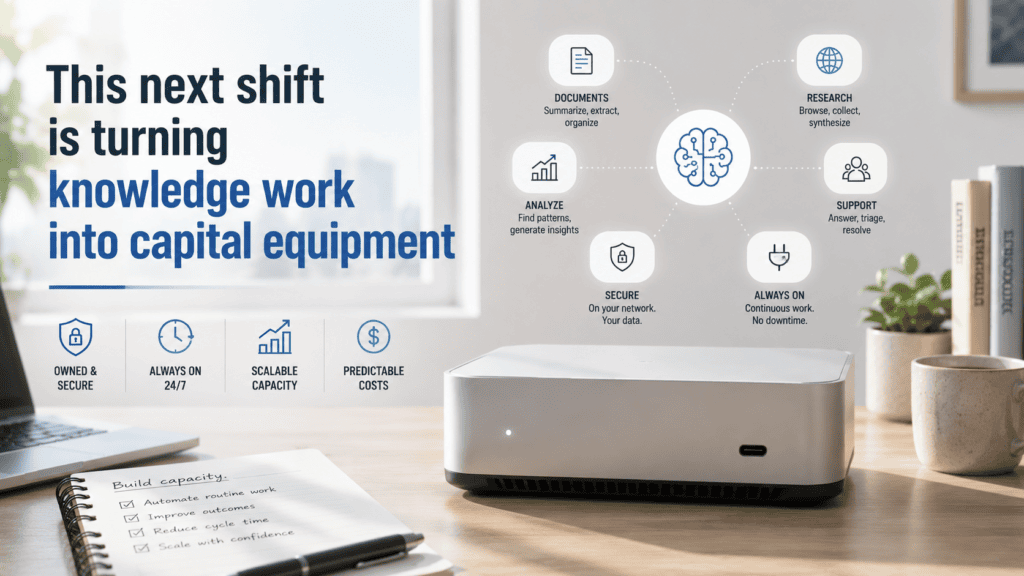
In this article, it means a small-form-factor computer (SFF) dedicated to running AI agents continuously. The company owns the hardware, while the agent can use local models, hosted models such as Claude, or a mix of both.
Isn’t Claude Cowork already doing this on my computer?
The experience can look similar, but there is an important difference. Current Cowork sessions run remotely by default on Anthropic’s servers, while the desktop app can give Claude access to files, browsers, and applications on your computer.
Why does this matter for hiring?
Because some knowledge-work capacity can now be evaluated as either labor or computing capacity. Employers may have another option besides adding headcount, outsourcing the work, or paying indefinitely for hosted AI services.
Is local AI faster?
Sometimes. Keeping inference on the device can remove cloud round trips and reduce latency, but frontier AI providers have far more computing power available for difficult tasks.
What should companies measure?
Useful completed work per dollar and per hour. That means looking beyond model speed to include accuracy, review time, concurrency, hardware costs, API costs, security, reliability, and the cost of mistakes.
Headcount has a new competitor
Manufacturers have spent more than a century deciding whether the next dollar should go toward labor or equipment. If a plant needs more output, it can hire another operator, add a shift, outsource production, or buy another machine. Labor and capital have always competed for the same production budget.
Office employers rarely had the same choice. They bought computers, software, databases, and cloud services, but those tools still depended on somebody operating them. A spreadsheet waited for an analyst. A CRM waited for a salesperson. A developer’s computer usually stopped contributing when the developer stopped working.
Always-on AI agents change enough of that equation to make the comparison interesting. A company can now dedicate a computer to software that stays available, watches for work, uses tools, and carries out workflows while nobody is sitting in front of the machine.
For some kinds of knowledge work, the computer is starting to look less like an employee’s tool and more like productive equipment.
That is a meaningful change in how companies can think about capacity.
“But Claude Cowork already runs on my computer”
Anyone using Cowork has a fair objection. Claude can work with files, applications, browser sessions, connectors, and other resources associated with your computer. With Dispatch, you can even send work from your phone and have Claude interact with resources on the desktop.
The experience feels local, but where the work happens is more complicated. Anthropic currently says Cowork sessions run remotely by default, with the agent loop and code execution taking place on Anthropic’s servers. When Claude needs something on your machine, such as a local file or browser session, it can reach that resource through the Claude Desktop app while the app is available.
That distinction matters because “AI running on my computer” can describe several very different setups.
An SFF computer could simply keep an agent online while sending every serious inference request to Claude, GPT, or another hosted provider. A different system could run both the agent and an open model locally. A third could handle routine work with a local model and send harder jobs to a frontier provider.
All three could look similar to the employee using them. They look very different to whoever is paying the bills, managing security, or deciding what happens when a provider is unavailable.
That is where ownership starts to matter. A company has to decide how much of the agent, model, data flow, computing cost, and uptime it wants to control itself.
Small boxes create a real speed tradeoff
It is tempting to assume that local AI must be faster because the machine is sitting three feet away. That can be true for some workloads, but it is a poor assumption to build a business case around.
Running inference on the device removes the need to send every request to a cloud service and wait for a response. NVIDIA specifically points to lower latency and the ability to operate without cloud calls as advantages of on-device inference.
The other side is raw computing power. A frontier AI provider can put specialized data-center hardware behind a request. An SFF computer has to work within the processor, memory, cooling, and power limits of a much smaller machine.
Local models may also be smaller or compressed so they fit comfortably on the available hardware. That can be perfectly acceptable for routine work, but a model that responds quickly and then produces something an employee has to spend ten minutes fixing is not actually fast in any useful business sense.
OpenClaw’s own documentation makes this tradeoff unusually clear. Its current guidance says comfortable fully local agent workloads with larger models can call for very substantial hardware, while a single 24 GB GPU is more appropriate for lighter prompts at higher latency.
That should keep companies from thinking every $800 mini PC is about to become a private replacement for a frontier AI service. It probably is not.
The better question is whether the box is powerful enough for the work you actually need it to do.
The metric that matters is completed work
This is where AI benchmarking can become a distraction. Tokens per second are easy to measure, so they get a lot of attention. Employers care about the work that comes out the other end.
Suppose a local model completes a first-pass research task in four minutes while a hosted model does it in 45 seconds. The local version may still win if the task runs thousands of times, the quality is good enough, the hardware stays busy, and API costs would otherwise pile up. If the local version regularly needs human correction while the hosted model gets the answer right, the economics can flip just as quickly.
The same calculation applies to coding, support classification, document processing, monitoring, reporting, and dozens of other workflows. A company needs to know how long the entire job takes, how many jobs can run at once, how often a person has to intervene, and what an acceptable completed result actually costs.
The number that matters is useful completed work per dollar and per hour.
That is a much more useful benchmark than asking whether local AI or cloud AI is “faster.”
The hardware is starting to make this practical
This conversation is happening now because compact hardware has improved enough to make always-on agent workloads plausible.
ASUS is unusually direct about the use case. Its NUC 16 Pro is an SFF system marketed for continuous AI assistant workloads and 24/7 operation, with configurations offering up to 180 TOPS of AI performance and up to 96 GB of memory. ASUS specifically lists agent applications such as OpenClaw and Hermes Agent.
NVIDIA and Microsoft are moving in the same direction on the software side, building local agent infrastructure for Windows PCs and positioning RTX systems for local AI applications.
None of that means businesses suddenly need to fill closets with mini PCs. It means the hardware is good enough that companies can begin testing the economics instead of treating the idea as theoretical.
The most practical setup may be hybrid. An SFF computer can remain online, watch for work, coordinate tools, and handle suitable tasks locally. When the job requires stronger reasoning, the agent can call a frontier model.
That arrangement gives the business some owned capacity without requiring it to recreate a frontier AI data center under somebody’s desk.
Stop comparing a computer to a salary
There will be a lot of bad math around this.
A “$1,000 computer versus a $70,000 employee” comparison sounds dramatic, but it tells an employer almost nothing. Companies need capacity to produce specific outcomes, and the cost of producing those outcomes is what belongs in the comparison.
Take a support workflow. What does it cost to classify 1,000 tickets accurately enough that a person only has to review the exceptions? For software teams, what does it cost to review 500 routine code changes? For a research function, what does it cost to produce 50 first-pass briefs that are good enough for an experienced employee to take over?
Once the workflow is defined, the company can compare the options honestly. Hiring another person may win. A contractor may win. Cowork or another hosted agent platform may win. An SFF system calling a frontier model may win. At enough volume, bringing some inference onto owned hardware may win.
Then the ugly costs have to go into the spreadsheet too. Human review, mistakes, API charges, software licenses, power, maintenance, downtime, security, hardware utilization, and the exceptions nobody thought about during the demo all count.
Plant managers understand this instinctively. They do not ask whether a machine is better than a human being. They ask whether it can produce the required output at the required quality, speed, reliability, and cost.
Knowledge-work leaders are starting to inherit the same problem.
This changes jobs before it changes headcount
The employment consequences get more interesting once companies start looking at individual workflows instead of entire job titles.
Consider a role where much of the week is spent on repeatable execution, while the rest requires judgment, technical decisions, customer communication, escalation, or accountability. The company may still need the person, but the old version of the job may no longer make sense.
Hiring somebody to perform the old workflow and adding automation six months later can leave the employer paying twice for the same capacity. The smarter order is to examine the work first, decide what should remain human, and design the position around that reality.
That changes recruiting. A junior developer who mainly produces routine code has a different value proposition from one who can review agent-generated code, catch failure modes, understand the system around it, and recognize when the machine has produced something technically plausible but wrong.
The same pattern can show up in support, operations, research, engineering, finance, healthcare administration, and other knowledge-heavy work. As repeatable execution gets cheaper, judgment, accountability, technical depth, communication, and exception handling become a larger share of what employers are actually paying a person to provide.
That means job descriptions will have to change too.
Where people still win
Huge categories of work still benefit from adding a person. Customer trust, leadership, negotiation, physical presence, technical intuition, accountability, relationship building, and decisions made under ambiguous conditions do not fit neatly into an automated workflow.
Agents make the clearest economic case when work is repetitive enough to measure, and the output is inexpensive to verify. As the cost of a bad decision rises, human review quickly becomes part of the economics.
That is why I expect more hiring requests to begin as capacity questions. A manager says the team needs more output, but the actual constraint might be headcount, software, computing power, model capability, workflow design, or the amount of qualified human review available.
Once companies start asking that question seriously, some requisitions will disappear. Some jobs will become more technical or more senior. Other roles will grow around integration, security, agent supervision, infrastructure, validation, and the decidedly unglamorous work of getting automated systems to behave inside a real organization.
That is a much more believable employment story than “AI replaces jobs.”
STEM Search Group works with employers on the talent side of that decision. When adding human capability is still the right move, the job is to figure out what the company actually needs now and recruit the engineers, technical leaders, operators, scientists, healthcare professionals, and specialists who can create value in an environment where more routine execution is moving to machines.
Sources
- Anthropic: Use Claude Cowork on web, desktop, and mobile
- Anthropic: Claude Cowork architecture overview
- Anthropic: Assign tasks from anywhere in Claude Cowork
- Anthropic: Let Claude use your computer in Cowork
- NVIDIA: Build personal AI agents on Windows PCs
- NVIDIA: Build local AI with NVIDIA GPUs
- NVIDIA: RTX AI Toolkit for Windows RTX PCs
- ASUS NUC 16 Pro
- ASUS: Computex 2026 AI ecosystem
- OpenClaw: Local models
- OpenClaw: Local model services
- MINISFORUM: CES 2026 mini workstations
- 250,000 manufacturers. One story nobody’s telling.
- Why everyone’s about to have to replace their computer
- Microsoft Research just mapped the future of work
- MIT has shown us the iceberg beneath Microsoft’s X-ray